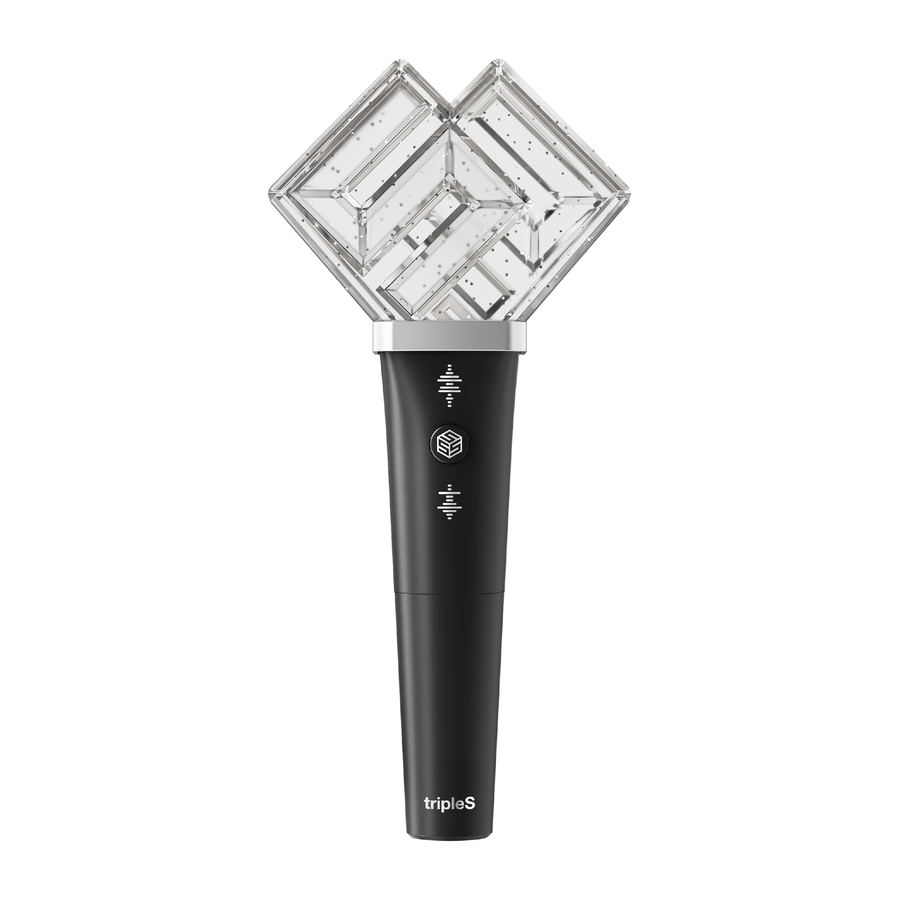
TRIPLE S Official Lightstick — Your Ultimate Fan Essential

$68
Celebrate every comeback with an official K-Pop lightstick designed to elevate your fan experience at concerts and events.
Featuring a sleek design and synchronized concert light effects, it completes your ultimate K-Pop collection with exclusivity and pride ✨
A must-have piece of official merch that connects you to the group and unites you with fans worldwide 💖
1
🌎
Worldwide shipping
From Seoul · 2–5 business days processing
📦
Tracked delivery
K-Packet 7–15 d · DHL Express 3–6 d
100% authentic
Sourced directly in Korea
🔒
Secure payment
SSL · 3D Secure
📖  How to use
TRIPLE S Official Lightstick Manual

Welcome to the TRIPLE S family! Here’s how to enjoy your new TRIPLE S Official Lightstick to the fullest:

1. Installing Batteries
Open the battery compartment at the bottom of the handle. Insert three AAA batteries, making sure the positive and negative ends are lined up correctly. Close the compartment securely.

2. Power On / Off
Press the power button to turn your lightstick on or off. The button is conveniently located on the handle for easy access.

3. Changing Light Modes
Press the mode button to cycle through different light modes:
- Solid Color
- Flashing
- Fading
- Color Changing
Experiment and find your favorite setting for every song!

4. Control with App (If Available)
Download the TRIPLE S Lightstick app from the App Store or Google Play. Pair your lightstick via Bluetooth following in-app instructions. This allows you to sync the light effects and colors during concerts!

5. Care & Maintenance
Keep your lightstick dry and avoid strong impacts. Clean the surface gently with a soft, dry cloth. Remove batteries when not in use for extended periods.

6. Troubleshooting
Light not turning on?
- Recheck the batteries: Are they new and correctly placed?
- Ensure compartment is tightly closed.
- Still not working? Contact our customer support team.

Thank you for supporting TRIPLE S. Enjoy every moment and light up every show with us!

TRIPLES Official Lightstick